
AntiAirtag Mini, touch-screen AntiAirtag Touch, and the free mobile app

A Bluetooth finder ecosystem for personal safety

Find Bluetooth trackers even when your phone stays silent.

Without waiting for an operating-system alert, scan for AirTag and other trackers with an active BLE broadcast; lock onto a target and narrow the signal down to its source.

Hardware coming soon. The mobile app will launch free on the App Store and Google Play.

BLE

Independent of alertsDirect scan of active BLE broadcasts

SMA

External antennaStronger reception than a phone

USB

USB-C connectionCharging, control, and updates

Free

Free appFor Android and iOS

Scanning with or without an alert

Turn suspicion into a concrete search.

iPhone and Android alerts only work on supported devices and when specific movement conditions occur. AntiAirtag hardware directly scans devices with an active BLE broadcast in range, even when the phone produces no alert.

01

Finding an AirTag in a car

A tag left outside the bodywork or behind metal may not produce regular alerts in the cabin. Record normal broadcasts as a baseline, then follow new signals around the cabin, trunk, and outer body.

Multi-angle scanning for metal reflections
02

Bag and belongings check

Filter active BLE broadcasts, including unbranded tags and pet trackers that never trigger an AirTag alert; pick a target and follow how its signal changes.

Search without looking at a screen, with sound + vibration
03

Home and workspace scan

Whitelist the devices you trust. Review the remaining broadcasts by suspicion score, manufacturer data, and beacon-like packets.

Your data stays on your device

Two devices, one ecosystem

As much control as you need.

From a simple, affordable standalone detector to a screen-based professional search experience.

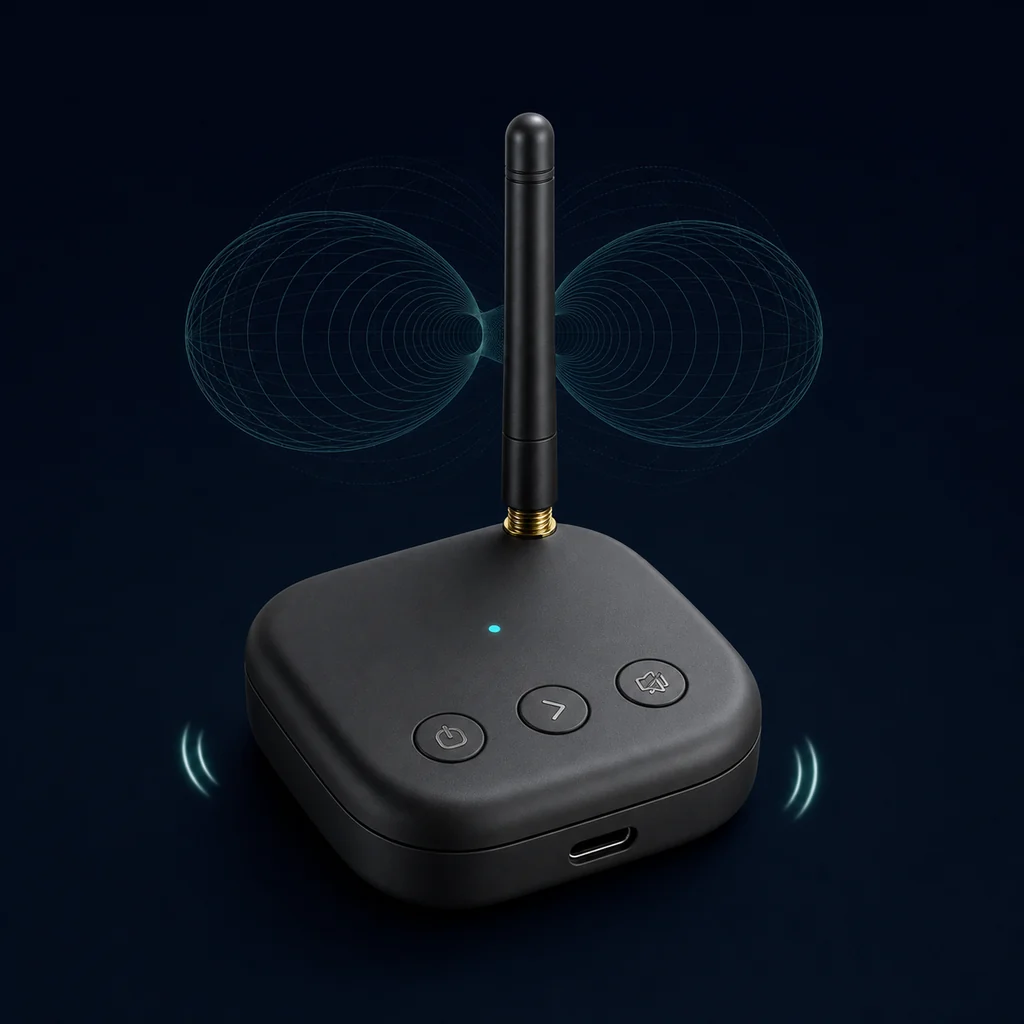
Screenless AntiAirtag Mini Bluetooth detector with USB-C connection Most accessible model

Screenless · small · standalone

AntiAirtag Mini

Turn it on without waiting for a phone alert, scan active BLE broadcasts, and lock onto a target. Sound and vibration that grow as you approach show you the way.

  • Independent of alerts: Scans with its built-in battery, without a phone alert.
  • Fast target selection: Step to the next device with the buttons and lock on.
  • Silent search: Mute the sound and continue with vibration only.
  • USB-C: Connect directly to a phone or charge the device.
  • App control: Monitor the devices it sees, manage settings, and update its firmware.
3D antennaExternal SMA antennaSound + vibration
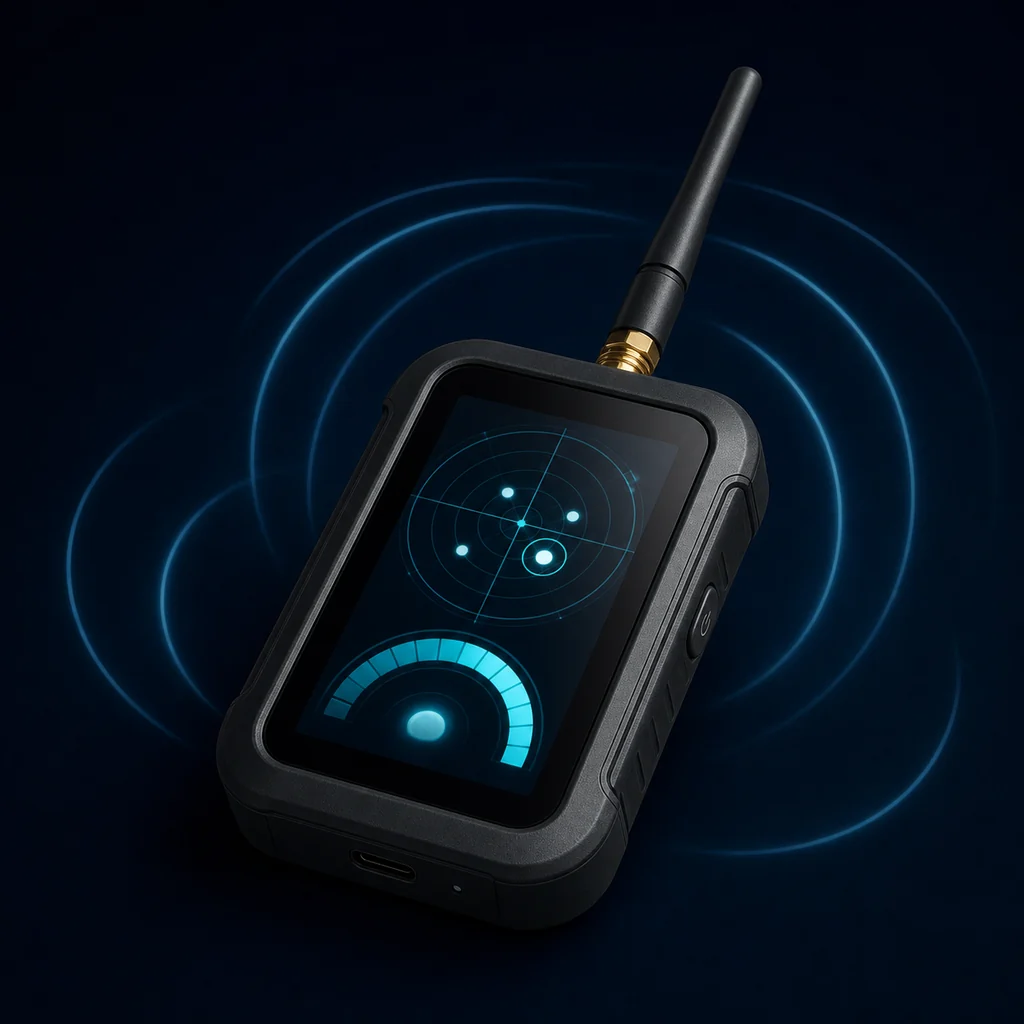
AntiAirtag Touch Bluetooth and AirTag detector with touch display Fully standalone control

Touch display · advanced control

AntiAirtag Touch

See broadcasts your phone does not recognize on its own display; manage target selection and signal strength without an operating-system alert.

  • Touch interface: Scan the device list, filter it, and select a target.
  • Live signal view: Follow the approaching/receding trend on screen.
  • Independent of alerts: All core scanning controls are on the device.
  • AntiAirtag App: Second screen on the phone, remote control, and updates.
  • Strong antenna system: 3D internal antenna plus replaceable external SMA antenna.
Touch displayExternal SMA antennaUSB-C
09:41● ● ▰
AntiAirtagScan active
◉
Mini connectedUsing hardware scan
%84
Seen14
New3
Suspicious2
Unnamed BLE deviceApple BLE data · new
−58 dBm
Beacon-like broadcastLast seen: now
−71 dBm
My carWhitelist
−64 dBm
TARGET SIGNALGetting warmer
⌁Scan◎Find▥Baseline⚙Settings

AntiAirtag App · always free

Start with your phone. Go further with hardware.

On its own, the app works as a focused Bluetooth scanner and signal finder. When Mini or Touch is connected, it brings strong-antenna scan data to your phone.

01

Smart BLE scanningReview RSSI signal, manufacturer data, Apple BLE data, and beacon-like broadcasts.

02

Hot / cold findingSearch with vibration that quickens as the selected signal strengthens, plus an approach trend.

03

Vehicle baselineRecord the devices normally in your car to separate new broadcasts more easily.

04

Hardware hubPair AntiAirtag devices; monitor, manage, and update their scans.

✓

Local and privacy-focused. Scan, whitelist, and baseline data stays on your phone; core scanning needs no account.

●SOONApp Store ▶SOONGoogle Play

How do you find an AirTag?

Narrow the signal in four controlled steps.

  1. 1

    Scan the area

    Build a list of nearby Bluetooth Low Energy broadcasts with the app or hardware.

  2. 2

    Set aside the known

    Whitelist your own devices; in a car, define the normal environment with a baseline recording.

  3. 3

    Lock onto a target

    Select a broadcast you cannot explain. Target it with the buttons on Mini, or from the list on Touch or in the app.

  4. 4

    Follow the signal

    Approach in small steps as the sound, vibration, and RSSI strengthen; re-check from different angles.

Beyond the phone antenna

The hardware advantage: stronger, steadier reception.

Phone antennas are designed for general use. AntiAirtag hardware pairs a 3D antenna structure focused on Bluetooth search with an external SMA antenna option.

3Dmulti-directional internal antenna geometry
SMAreplaceable external Bluetooth antenna
EMAsignal smoothing that reduces fluctuation

Detection performance varies with the environment, obstacles, the device's broadcast interval, antenna choice, and electromagnetic noise.

Choose the right AntiAirtag

Three ways to use it, one goal.

Start with the free app; move to hardware for a stronger antenna and standalone use.

FeatureMobile AppMiniTouch
BLE device scanning✓✓✓
Works without the app—✓✓
3D + external SMA antenna—✓✓
Sound and vibrationPhone✓✓
On-device displayPhone—✓
Whitelist and vehicle baseline✓With appWith app
Hardware updatesManagesWith appWith app
Price positionFreeAffordableAdvanced

Right expectations, safer use

A signal finder — not a definitive identification device.

!AntiAirtag shows Bluetooth broadcasts and packet indicators. It cannot by itself confirm that a broadcast is an AirTag or a malicious tracking device.

!A missing phone alert does not mean no device is present; automatic alerts depend on the supported network, movement pattern, settings, and detection conditions.

!RSSI expresses approximate proximity; walls, people, metal, and car bodies can reflect or weaken the signal.

!Devices that are off, not broadcasting, use only cellular/GPS, or are non-Bluetooth cannot be detected.

!If you face urgent danger or suspect persistent stalking, move to a safe area without tampering with the device, and contact law enforcement.

Frequently asked questions

What people ask about AntiAirtag.

Straight answers on technical limits, searching a car, and blocking AirTags.

How do I find an AirTag?

First use your iPhone or Android unwanted-tracking alert and its play-sound feature. With no alert, scan nearby BLE broadcasts, set aside your own devices, and approach the source as your selected signal strengthens. Because metal and walls reflect signals, re-check from different directions several times. Read the step-by-step AirTag finding guide.

How do I find an AirTag in a car?

Scan the car in its normal state for 1–5 minutes to build a baseline. Select broadcasts that appear later, then slowly scan the cabin, under the seats, and the trunk first, followed by the wheel arches and around the outer body. Because metal surfaces in a car can mislead RSSI, check each zone from different angles.

What exactly does an AirTag detector detect?

AntiAirtag detects Bluetooth Low Energy advertising broadcasts and signal strength. Manufacturer data, service data, and beacon-like packet formats help the review, but on their own they do not definitively prove a device's brand, model, or intent.

Does AntiAirtag scan when the phone never alerts about an AirTag?

Yes. Mini and Touch scan active BLE advertising broadcasts in range without waiting for the operating system to classify a device as “unwanted tracking” and produce an alert. That way, unbranded or pet tracking tags outside the compatible network can also be seen if they broadcast BLE. Devices that are off, out of battery, heavily shielded, or not broadcasting BLE cannot be seen.

Does it block AirTags or jam signals?

No. AntiAirtag is not a jammer and does not interfere with radio signals. Jammers can also cut off legitimate communications, and their use is subject to legal restrictions. The safe method is to find the device, preserve the evidence, and disable it per the manufacturer's instructions or with law-enforcement support.

Does the mobile app find every Bluetooth device?

The app sees compatible BLE devices that are broadcasting. Devices with Bluetooth off, a very long broadcast interval, out of range, using only classic Bluetooth, or using non-Bluetooth tracking technology may not be listed.

Why does the hardware work better than a phone?

Mini and Touch carry a 3D antenna dedicated to Bluetooth search plus an external SMA Bluetooth antenna. Under compatible conditions, this focused hardware can provide stronger and steadier reception than a phone's general-purpose internal antenna.

Can AntiAirtag Mini be used without the app?

Yes. It scans standalone with its built-in battery; targets are selected with the buttons, and sound and vibration grow as you approach. When the app is connected, extras such as viewing the device list, remote management, and updates become available.

Is the app paid, and does data go to the cloud?

The AntiAirtag app will be free on the App Store and Google Play. Core scanning, whitelist, and vehicle baseline data is stored locally on the phone; core use needs no account or cloud transfer.

Coming soon

Know what is broadcasting around you.

Contact us for product launch dates, the app release, and early-access announcements.